Pandas 3: Plotting NYS Mesonet Observations



Pandas 3: Plotting NYS Mesonet Observations
Overview
In this notebook, we’ll use Pandas to read in and analyze current data from the New York State Mesonet. We will also use Matplotlib to plot the locations of NYSM sites.
Imports
import matplotlib.pyplot as plt
import numpy as np
import pandas as pd
Create a Pandas DataFrame object pointing to the latest set of obs.
nysm_data = pd.read_csv('https://www.atmos.albany.edu/products/nysm/nysm_latest.csv')nysm_dataCreate Series objects for several columns from the DataFrame.
First, remind ourselves of the column names.
nysm_data.columnsIndex(['station', 'time', 'temp_2m [degC]', 'temp_9m [degC]',
'relative_humidity [percent]', 'precip_incremental [mm]',
'precip_local [mm]', 'precip_max_intensity [mm/min]',
'avg_wind_speed_prop [m/s]', 'max_wind_speed_prop [m/s]',
'wind_speed_stddev_prop [m/s]', 'wind_direction_prop [degrees]',
'wind_direction_stddev_prop [degrees]', 'avg_wind_speed_sonic [m/s]',
'max_wind_speed_sonic [m/s]', 'wind_speed_stddev_sonic [m/s]',
'wind_direction_sonic [degrees]',
'wind_direction_stddev_sonic [degrees]', 'solar_insolation [W/m^2]',
'station_pressure [mbar]', 'snow_depth [cm]', 'frozen_soil_05cm [bit]',
'frozen_soil_25cm [bit]', 'frozen_soil_50cm [bit]',
'soil_temp_05cm [degC]', 'soil_temp_25cm [degC]',
'soil_temp_50cm [degC]', 'soil_moisture_05cm [m^3/m^3]',
'soil_moisture_25cm [m^3/m^3]', 'soil_moisture_50cm [m^3/m^3]', 'lat',
'lon', 'elevation', 'name'],
dtype='object')Create several Series objects for particular columns of interest.
stid = nysm_data['station']
lats = nysm_data['lat']
lons = nysm_data['lon']
time = nysm_data['time']
tmpc = nysm_data['temp_2m [degC]']
tmpc9 = nysm_data['temp_9m [degC]']
rh   = nysm_data['relative_humidity [percent]']
pres = nysm_data['station_pressure [mbar]']
wspd = nysm_data['max_wind_speed_prop [m/s]']
drct = nysm_data['wind_direction_prop [degrees]']
pinc = nysm_data['precip_incremental [mm]']
ptot = nysm_data['precip_local [mm]']
pint = nysm_data['precip_max_intensity [mm/min]']time0 2026-03-13 00:20:00
1 2026-03-13 00:20:00
2 2026-03-13 00:20:00
3 2026-03-13 00:20:00
4 2026-03-13 00:20:00
...
122 2026-03-13 00:20:00
123 2026-03-13 00:20:00
124 2026-03-13 00:20:00
125 2026-03-13 00:20:00
126 2026-03-13 00:20:00
Name: time, Length: 127, dtype: objectExamine one or more of these Series.
tmpc0 -2.3
1 -2.0
2 -1.7
3 2.6
4 -2.7
...
122 -6.4
123 -3.0
124 0.2
125 -0.6
126 -0.3
Name: temp_2m [degC], Length: 127, dtype: float64# Write your code below
Convert the temperature and wind speed arrays to Fahrenheit and knots, respectively.
tmpf = tmpc * 1.8 + 32
wspk = wspd * 1.94384
Examine the new Series. Note that every element of the array has been calculated using the arithemtic above ... in just one line of code per Series!
tmpf0 27.86
1 28.40
2 28.94
3 36.68
4 27.14
...
122 20.48
123 26.60
124 32.36
125 30.92
126 31.46
Name: temp_2m [degC], Length: 127, dtype: float64tmpf.name = 'temp_2m [degF]'tmpf0 27.86
1 28.40
2 28.94
3 36.68
4 27.14
...
122 20.48
123 26.60
124 32.36
125 30.92
126 31.46
Name: temp_2m [degF], Length: 127, dtype: float64Next, get the basic statistical properties of one of the Series.
tmpf.describe()count 127.000000
mean 29.368031
std 3.666102
min 20.480000
25% 26.960000
50% 29.660000
75% 31.820000
max 40.280000
Name: temp_2m [degF], dtype: float64tmpc90 -2.2
1 -2.4
2 -1.4
3 2.4
4 -2.7
...
122 -6.6
123 -2.9
124 0.4
125 -0.6
126 -0.4
Name: temp_9m [degC], Length: 127, dtype: float64Check if any of the values are set to missing (NaN, aka Not-a-Number)
missing = tmpc9.isna()missing0 False
1 False
2 False
3 False
4 False
...
122 False
123 False
124 False
125 False
126 False
Name: temp_9m [degC], Length: 127, dtype: boolnysm_data[missing]# Write your code below
Plot station locations using Matplotlib
We use another plotting method for an Axes element ... in this case, a Scatter plot. We pass as arguments into this method the x- and y-arrays, corresponding to longitudes and latitudes, and then set five additional attributes.
fig = plt.figure(figsize=(12,9))
ax = fig.add_subplot(1,1,1)
ax.set_title ('New York State Mesonet Site Locations')
ax.scatter(lons,lats,s=9,c='r',edgecolor='black',alpha=0.75)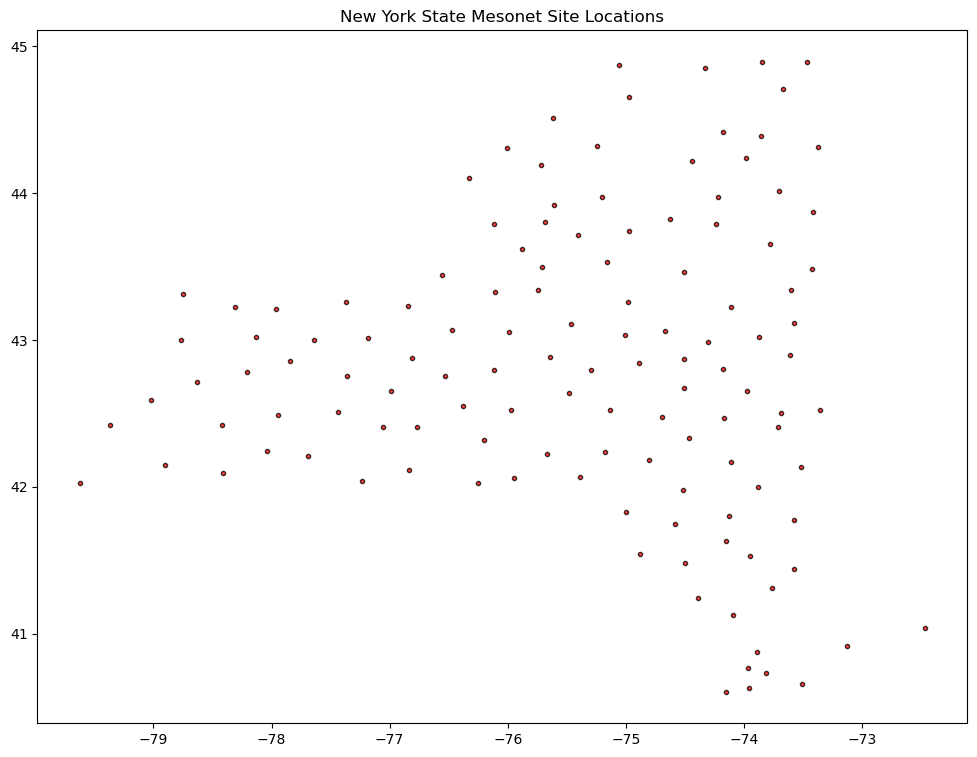
# Write your code below
What’s Next?
We can discern the outline of New York State! But wouldn’t it be nice if we could plot cartographic features, such as physical and/or political borders (e.g., coastlines, national/state/provincial boundaries), as well as georeference the data we are plotting? We’ll cover that next with the Cartopy package!